> For the complete documentation index, see [llms.txt](https://help.canoa.supply/docs/llms.txt). Markdown versions of documentation pages are available by appending `.md` to page URLs; this page is available as [Markdown](https://help.canoa.supply/docs/collect/my-catalog/working-in-table-view/how-to-import-your-product-data/how-to-import-2d-vector-data-drawings.md).
# How to import 2D vector data (drawings)
This article will teach you how to upload an CAD drawing (.dwg, .dxf or .3dm) individually and in bulk, and how to draw a 2D drawing for your custom products.
Below you'll find how to upload drawings into your product data that lives in **My Catalog**. If you'd like to learn how to upload drawing files into Canvas to start designing with immediately, read this article linked here:
{% content-ref url="/pages/XpW3bDxbhXPcfrTRxHMH" %}
[How to Import and Scale floor plans](/docs/design/how-to-import-and-scale-floor-plans.md)
{% endcontent-ref %}
## How to upload a drawing file (DWG, DXF, 3DM) from AutoCAD, Revit, SketchUP, and Rhino into your product data:
1. Create a new product within **My Catalog** or start with a product that has been already imported.
2. Click on the product you wish to add a 2D drawing to which will pull up the editing tool on the right side.
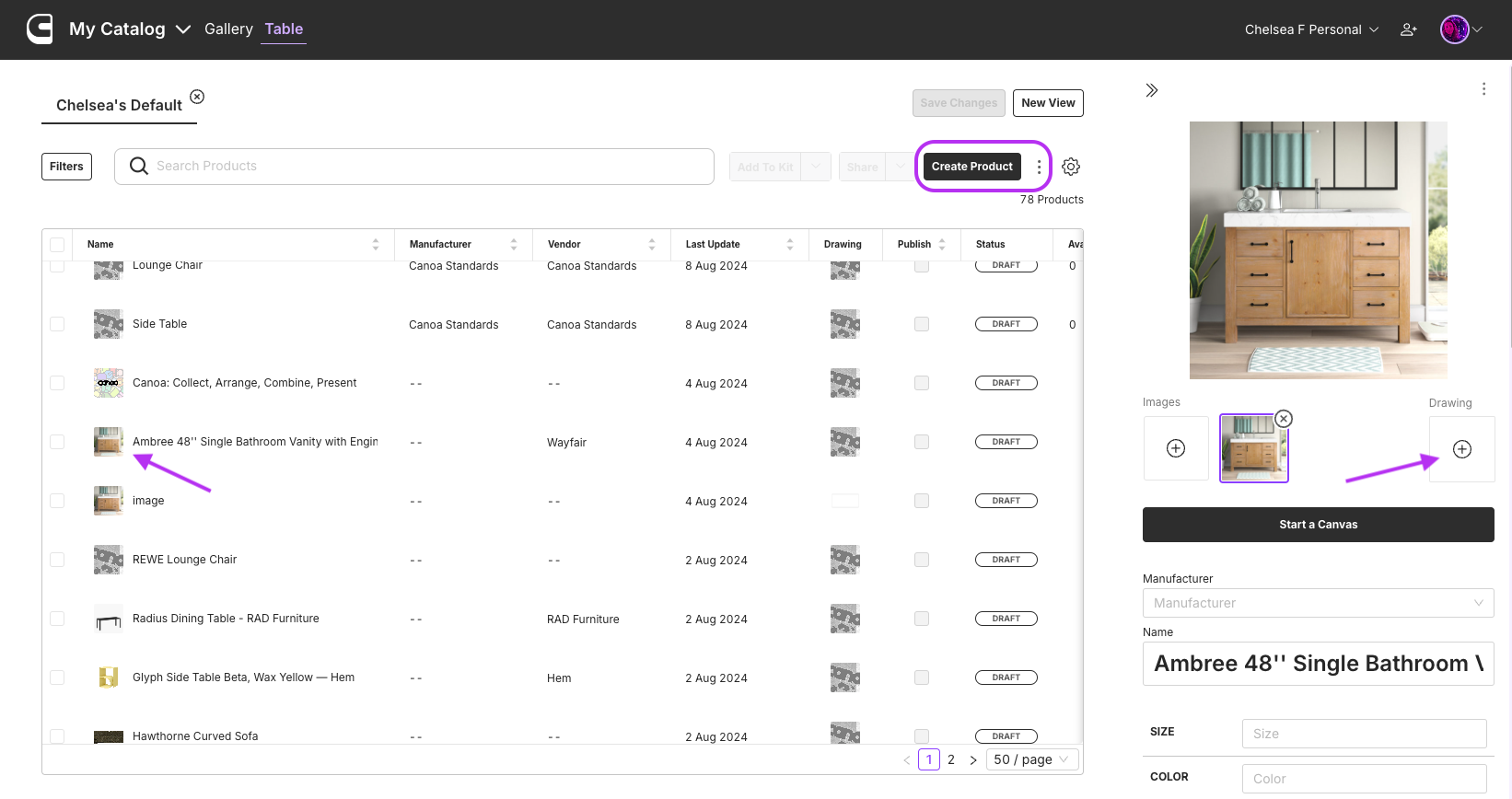
3. Click on the **Drawing Icon** under the main product image. This will open up the **Drawing Editor**.
Table view - How to add a drawing
## Import an existing vector file:
* In the **Drawing Editor,** select your 2D file from your computer by clicking **Import Drawing** in the upper right hand corner.
* Need help understand what kind of drawing file you need to have a successful import? Read this article linked here:
{% content-ref url="/pages/T4rnj48or1riVQVYISNu" %}
[Best practices for uploading vector data](/docs/collect/my-catalog/working-in-table-view/how-to-import-your-product-data/how-to-import-2d-vector-data-drawings/best-practices-for-uploading-vector-data.md)
{% endcontent-ref %}
Select your 2D drawing to import
## Create your own drawing:
* In the **Drawing Editor,** draw your 2D drawing using the **Ellipse, Polyline or Rectangle tool**. This is great for simple shapes.
### **Using the drawing tools:**
* Confirm the scale with the **Measure Tool.**
* Refine your drawing with the **Outline Style** and **Fill Tools.**
Drawing Editor
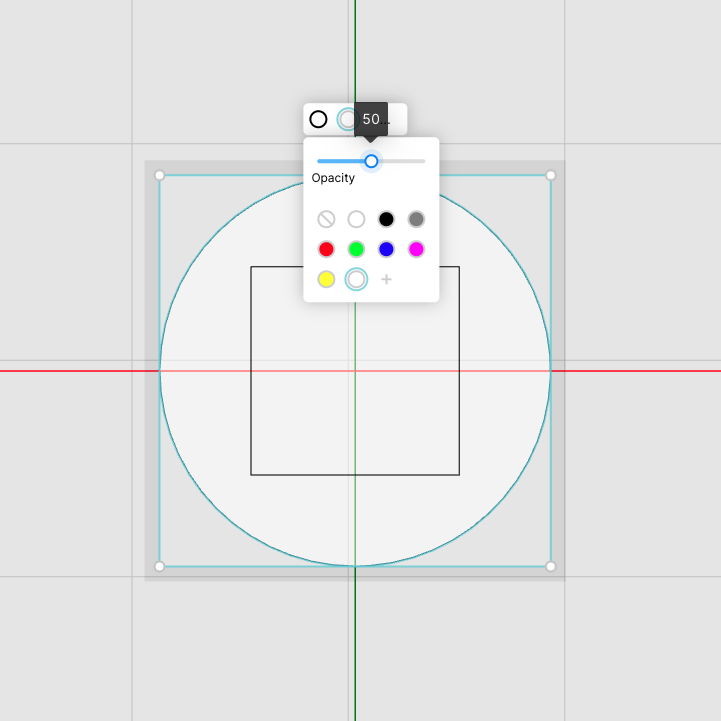
* We at Canoa prefer a black outline with a 50% opacity white fill when designing in [**Canvas**](https://www.canoa.supply/canvas) but feel free to get creative.
Select your outline color and fill color/opacity
{% hint style="info" %}
No need to worry about saving your work. Your drawing will automatically be saved and the product card will be updated with the new 2D drawing.
{% endhint %}
## Bulk import your vector data using My Catalog - Table:
You are able to utilize bulk importing and exporting features with **My Catalog** in the **Table** view. This tool allows you to create and update 5 to 2,000 custom product cards in a matter of seconds. Bulk import your .dwg/.dxf drawings by importing the Drawing URLs in a CSV file.
1. Save your 2D vector data (drawings) as a .dwg or .dxf to your preferred cloud storage like AWS, Dropbox, GoogleDrive, etc.
{% hint style="info" %}
If you are saving your drawing files in a GoogleDrive, you will need to set the link parameters. Refer to this [Google Drive Link Generator](https://docs.google.com/spreadsheets/d/1kJ6fSYZAeh1pDPySu_rXGA6QCHFN8zs9ZWS92MhlQG4/edit?usp=sharing) to format the parameters.
{% endhint %}
2. Test your link and make sure it opens the file and does not open a folder.
3. Open your Canoa provided [**Product Data Template**](https://docs.google.com/spreadsheets/d/1jBbhwIQ2Jj5Z14_8MdPvxC8uDidg-GK8shcYdoMLFXs/edit#gid=245220932) and paste the link in the **Drawing column**.
1. If you are updating existing products on Canoa, make sure you have their **Product IDs**. If you are creating new products, no Product ID column is necessary.
4. Download your spreadsheet as a **CSV file**.
5. Import your CSV into My Catalog by clicking **Import** within the three dots in the Table view.
6. Make sure all fields that you would like to update or create are selected before clicking Import.
7. Check your email or look out for the 'Import Complete' notification.
8. Click on each product's drawing editor to check or modify your 2D drawing.
Continue reading onto the next article to learn more about the best drawing files for successful uploads into Canoa. View examples of high, variable, and low quality drawings that our platform supports.
---
# Agent Instructions
This documentation is published with GitBook. GitBook is the documentation platform designed so that both humans and AI agents can read, navigate, and reason over technical content effectively. Learn more at gitbook.com.
## Querying This Documentation
If you need additional information that is not directly available in this page, you can query the documentation by asking a question.
Perform an HTTP GET request on the following URL with the `ask` and `goal` query parameters:
```
GET https://help.canoa.supply/docs/collect/my-catalog/working-in-table-view/how-to-import-your-product-data/how-to-import-2d-vector-data-drawings.md?ask=&goal=
```
`ask` is the immediate question: it should be specific, self-contained, and written in natural language.
`goal` is what the user is ultimately trying to achieve, the reason they need the answer. Sharing it helps GitBook give you a better, more relevant answer. A goal is most helpful when it describes the outcome the user wants rather than restating the question. For example, with `ask=how do I create an API token`, a goal like `automate deployments from our CI pipeline` lets GitBook tailor the answer to that use case.
The response will contain a direct answer to the question and relevant excerpts and sources from the documentation.
Use this mechanism when the answer is not explicitly present in the current page, you need clarification or additional context, or you want to retrieve related documentation sections.