# Keyboard Shortcuts
## Popular Keyboard Shortcuts:
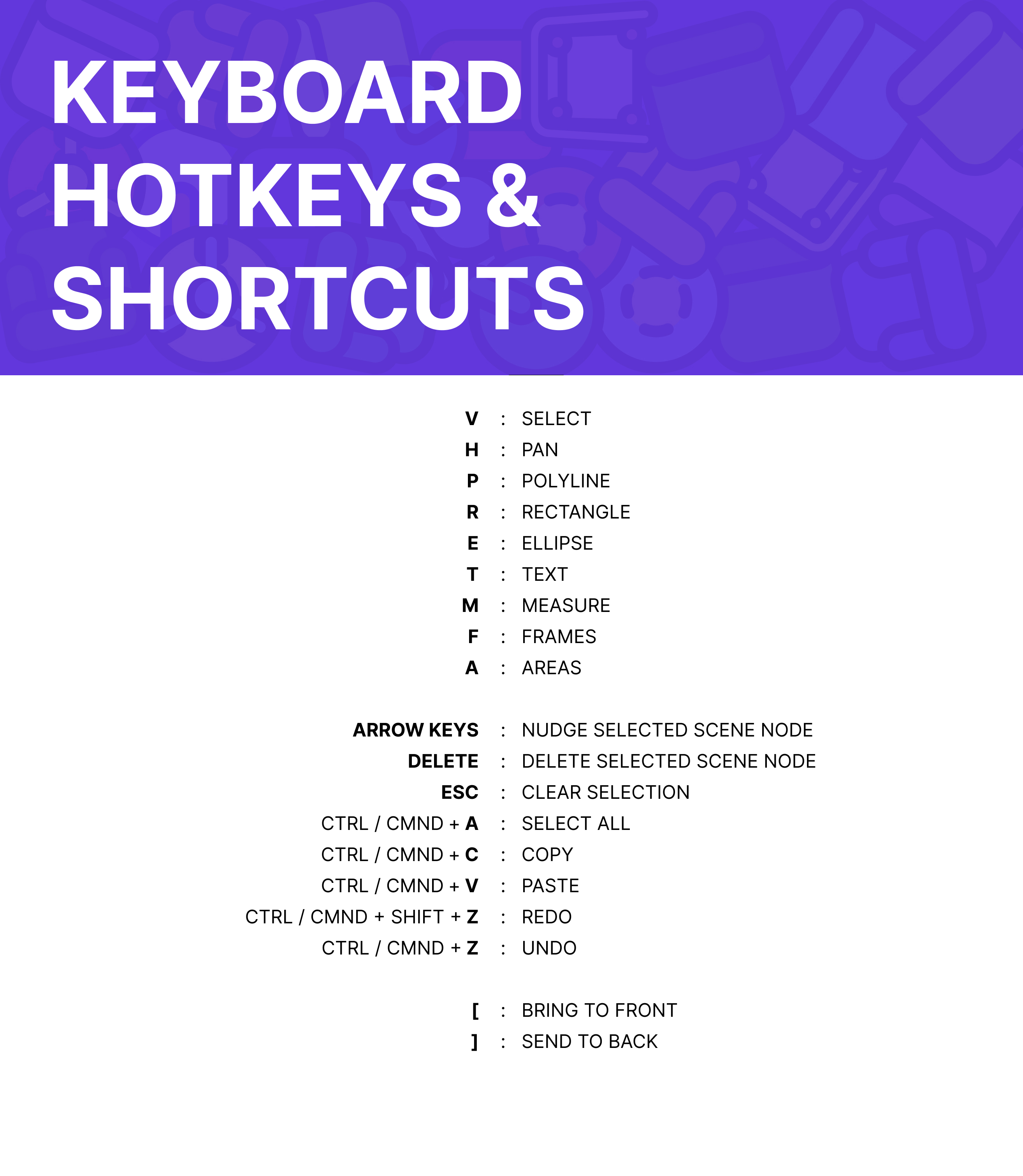
Keyboard shortcuts
### Hot Keys for Switching Tools in Canvas:
* In your Canvas mood board, use the following Keys to switch in between the tools in the top, main toolbar:
* `V` -> Select
* `Spacebar` -> Pan
* A helpful way to Pan throughout the Canvas for easy movement is by holding down the Spacebar and clicking and dragging your cursor throughout the space.
* `H` -> Pan
* `P` -> Draw
* `R` -> Rectangle
* `E` -> Circle
* `T` -> Text
* `M` -> Measure
* `F`-> Frames
* `A` -> Draw Areas
* `Arrow Keys` -> Nudge selected scene node
* `Delete` -> Delete selected scene node
* `ESC` -> Clear selection
* `CTRL` / `CMND + A` -> Select All
* `CTRL` / `CMND + C` -> Copy
* `CTRL` / `CMND + V` -> Paste
* `CTRL` / `CMND + Z` -> Undo
* `CTRL` / `CMND + Shift + Z` -> Redo
* `Shift` / `CTRL` / `CMND + [` -> Bring to Front
* `Shift` / `CTRL` / `CMND + ]` -> Send to Back
## **Right-click Menu:**
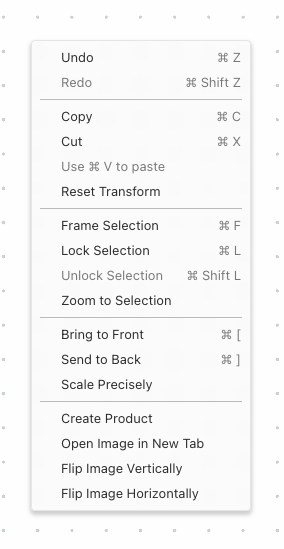
* In you Canvas mood board, right-click in your Canvas to pop-up the right-click menu. Here is where you'll find a current list of keyboard shortcuts that activate various design features in your Canvas.
Canvas Right-Click Menu
### Actions and features that are located in the right-click menu:
* Undo -> `CTRL` / `CMND + Z`
* Redo -> `CTRL` / `CMND + Shift + Z`
* Copy -> `CTRL` / `CMND + C`
* Cut -> `CTRL` / `CMND + X`
* Paste -> `CTRL` / `CMND + V`
* Crop
* Reset Transform
* Distribute Selection
* Align Horizontal
* Align Vertical
* Group Selection -> `CTRL` / `CMND + G`
* Ungroup Selection -> `CTRL` / `CMND + Shift + G`
* Frame Selection -> `CTRL` / `CMND + F`
* Lock Selection -> `CTRL` / `CMND + L`
* Unlock Selection -> `CTRL` / `CMND + Shift + L`
* Zoom to Selection
* Bring to Front -> `Shift` / `CTRL` / `CMND + [`
* Send to Back -> `Shift` / `CTRL` / `CMND + ]`
* Set as Thumbnail
* Scale Precisely
* Create Product
* View Product Details
* Open Image in New Tab
* Flip Image Vertically
* Flip Image Horizontally
---
# Agent Instructions: Querying This Documentation
If you need additional information that is not directly available in this page, you can query the documentation dynamically by asking a question.
Perform an HTTP GET request on the current page URL with the `ask` query parameter:
```
GET https://help.canoa.supply/docs/getting-started/keyboard-shortcuts.md?ask=
```
The question should be specific, self-contained, and written in natural language.
The response will contain a direct answer to the question and relevant excerpts and sources from the documentation.
Use this mechanism when the answer is not explicitly present in the current page, you need clarification or additional context, or you want to retrieve related documentation sections.